
How to refine search in Big Commerce when looking for a pipe. What is re-creatable and what is sold. What can I sell my customer.
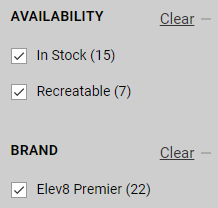
You can add these filters on top to remove all of the items that are not re-creatable:
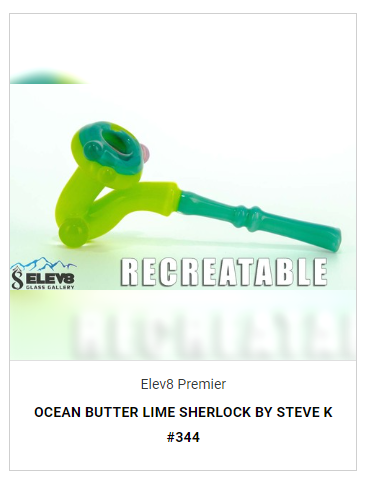
If it has an image that says “SOLD” then it’s not recreatable, re-creatable pieces get their own image, like this:
Liquid Arts Glassblowing Raffle for Elev8 Premier
Gmail Scripts For Customer Service
See protected link
Protected: Gmail Scripts For Customer Service
Marketing/Web Manual Master Page — Resources and Standard Operating Procedures
https://docs.google.com/spreadsheets/d/1H7kmrPW6krSKFVVH8-s81SULvpOMJhD3sc4NCFADFIo/edit?usp=sharingThis is the master page for our Marketing/Web Manual. The resources and SOPs below should be used any time that Marketing/Web jobs need to be covered, whether by someone filling in for the position or when training someone who is not familiar with these procedures.
Resources
- Marketing/Web Accounts and Passwords — This will give you access to any accounts used by Marketing/Web, passwords are updated regularly as required.
- Marketing Plan for Silver Surfer
- BigCommerce Support Pin — 261043 (you will need this if you ever run into issues with BigCommerce that cannot be solved internally)
- Live Chat Support — Click “Help” at the bottom of the sidebar menu and then click “Live Chat Online“
- Phone Support — (888) 699-8911
- Email Support
- Elev8 Problems Form — If you need help with anything internally, submit a request to this form. If the issue is urgent submit the form AND THEN go ask Steve or Adam. This form helps us to know what issues need to be documented on the Knowledge Database.
Standard Operating Procedures
Managing Tasks
Out of Stock Notifications / Removing Products
- Marking Custom Glass as Sold (Non-Consigment)
- Retrieving Sold Custom Glass From the Retail Stores
- Removing Out of Stock Color Variants From Elev8 Glass/Elev8 Distribution Products.
- Removing Glass From Big C (when it sells from the shops or wholesale — this version is old, you should use the Marking Custom Glass as Sold (Non-Consignment) procedure linked above instead.)
Adding New Products
- Adding New Elev8 Glass/Elev8 Distribution/Elev8 Vaporizers Products
- Adding New Elev8 Premier One-Offs for Elev8 Distribution
- Adding New Elev8 Premier Consignment Glass (COLAB SKUs)
- Adding New Outside Artist Glass (High End Glass for Retail Shops)
- Adding Items to Big C
- Adding New Products to Elev8.One (when needed)
Updating Existing Products
- Bulk Edit Procedures for Existing Products
- Product Standards (Descriptions and Meta Info)
- Taking inventory of glass at locations
- Server 500 Error
- How to add information to products in the grey information bar
Managing Consignment Glass (COLAB SKUs)
Taking Product Photos
Promotions and Sales
- How to Set Up a New Promotion
- How to Make Coupon Codes
- Sending out Newsletters in Spring Bot
YouTube
- Writing YouTube Descriptions
- Uploading New Videos to YouTube
- Producing Elev8 at 8
- Making Function Videos with Kine Master (we are using Power Director for this now, the article needs to be updated)
- Video Folder
Social Media
- Making Videos for Social Media (Reels vs YouTube videos)
- Social Media Marketing
- Instagram/Facebook Posting Guidelines
- Downloading Customer Calls for Marketing Purposes.
Elev8 University
- Checking Student Completion and Sending Certificates of Completion
- Updating Elev8 University Courses
Elev8 Ambassador
- Updating Elev8 Ambassador Spreadsheet
Blogs
- Writing Blogs and Posting Blogs Written by Others (the essential processes that have to be done for every blog – writing/editing the text, adding links, adding images, making and adding the thumbnail image, and author)
Knowledge Database / Questions and Answers
Using Lightroom for Product Images
Open adobe Lightroom on your computer. You should have the login info
Click on Library

Save the images from the camera to new photos and make a new folder of the date. Unloade the images there.
Now highlight them all and drag and drop them into LightRoom
Click on Develop now
Each image kinda has to be adjusted. If it was all perfect you can just do one good setting, but it doesn’t not work for white and black and then bright and not bright glass. Glass is hard to photograph, but with what we have, we can do it great!
These settings are solid, but some will have to chagne
WHITE
ALWAYS
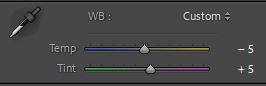
- move temp to -5 and tint to +5
- Exposure may have to go up, more than black
- Contrast Usually around 15-35
- Highlights +10-+35
- Shadows play, but not alot
- Whites 20-80
- Blacks 0
- Vibance +10
- Saturation +10
BLACK
ALWAYS
- move temp to -5 and tint to +5
- Exposure may have to go up
- Contrast Usually around 15-25
- Shadows -‘s
- Whites 0 or –
- Blacks -30 to -85
- Vibance +10
- Saturation +10
Do the typhoon bangers fit with any e-nail coil sizes?
The Typhoon banger will only fit inside a 25mm enail heater coil. You must also use some wire to connect the Typhoon to the E-Nail heater so they do not fall apart.
Leaving Notes In Elev8 One for Customer Care Retail
Leaving notes for your customers is very very important to the exceptional experience we want to offer our customers. We work as a team so we must leave these notes so our teammates can run with the ball when needed.
Open Elev8.one
Click on Contacts

In search contacts, you will search for the contact you are working with. Click on the contact and the contact will open up.
If the contact is not there, you will need to add them.
Leave a note in the field of what you talked about. Add any info someone else might need, and what you might forget.

Why can crushed opal rods be hard to work with?
Like any glass that has an additive, it become more difficult to work with. Also, opal is not 100% compatible with borosilicate. An opal can cause a crack many years down the road. This is why Steve rarely uses them, but they are sexy.
Also, if a blower is not good, it will burn out the opal, making it just white flakes.