
If you fill your bowl too much on the SSV, or DBV, you run the risk of burning it, or having some herbs fall into the unit, more so on a DBV.
Accounting
Accounting Job Duties
BOOK KEEPING MONTHLY/QRTLY/ANNUAL CHECK LIST 2023
Trello Board
- How to work wave
- Manual Deposit Tracking Sheet for comparing to deposits in WAVE accounting
- Importing CSV files
- New Hire
- Employee
- 1099
- Employee
- Loans
- Loan Document Template
- Loan 1
- Loan 2 $40k
- Checking the Time Clock
Atom Sun
Elev8 Distribution
Salaried Employee Time Off
Elev8 Distribution Quarterly Tax Sheet
Important Info ( PHONE NUMBERS, FEIN, RENT, ACCOUNT #s)
Paying Royalties for Glass (COLAB) and SSV’s (ARTIST)
Elev8 Premier
- Paying out Monthly consignments
- Monthly Consignment Payout Sheet
- PAYOUT SHEET for Shops
- Paying out on all Collaboration glass sold
Glassblower Employee Pay Sheet
Elev8 Premier Pay Sheet for Blowers
Cost of Elev8 Premier Products
Elev8 Ambassador Referral Program
HEMP and ELEV8 GLASS GALLERY
Employee Tracking Sheet for HEMP and Glass Gallery who work at other locations
Glass that is sold on the website that the stores own
Prices Paid for ELEV8 Glass Shops from ED
Make sure Comcast, utilities are being paid
Keeping track of what store owes what store what
Pay both shops credit card bills
Paying sales tax
Paying rent
Make sure website glass is getting reimburse to elev8
Payroll and shop bonuses
PTO
Paystub website setup
New employee stuff
Updating current employees info
Termination checks
All important docs FEIN ECT
Checking mail at both shops
Collecting tax documents
K1 ect
Filing writeups and paperwork
Lawsuits or chargebacks
Tobacco license
Sales tax license
Where things are filed
Taxes
How to keep track of where to log what’s what for purchases inventory vs tissues TP ect
Mail at both shops
Atom sun, elev8 dist how we get paid back for web sales
Raises payroll
How to make in invoice in Wave
- Log into Wave
- Click on the business you are making an invoice from
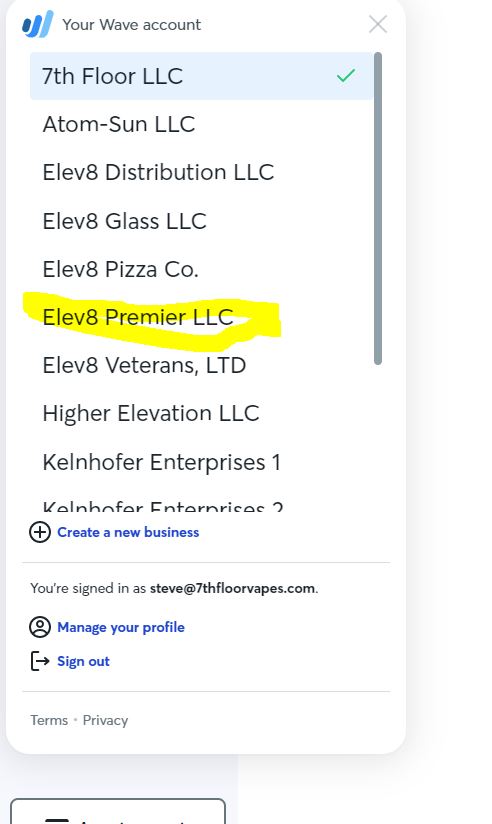
- Click on Sales and Payments
- Click on Invoices
- Click Create a new invoice
- Click add a customer
- If you see a customer you have used before, pick that customer
- For a new customer click on Create a new customer
- Enter their full name or business for the Customer input
- Enter their email (this is where the invoice will be sent to)
- Enter their phone number if you have it
- Enter their first and last name of the contact
- click save
- Click Add Item
- If you see an item click it and add it.
- If you do not see the item click Create a new item
- Enter the name
- Enter a description
- Enter the price
- Click Edit Income account and pick proper account. If you have ANY questions please ask the book keeper for advice.
EXAMPLE View Income Account – if it is Raw Glass, click on Raw Glass
- Scroll down and click Save and continue
- Click Approve Draft
- Click Send Invoice
- Check the Send a copy to myself
- Check attach the invoice a pdf
- Click Send
- Click close and you are done
Protected: Printing Labels for Orders
Protected: HOW TO PRINT A LABEL WITHOUT AN EXISTING ORDER
Protected: Open the Shipping Area
Passwords to Elev8 Premier
The password to get on to the computer is 6331
Password for GMAIL. Behind computer monitor in office.
Spotifiy Steve’s email and pass is 1steve1
I am not able to leave a note in Elev8.one for a customer or contact
In order to leave notes you the customer must have a (First Name, Last Name, Email and Office Phone.
If the contact has all of these and you still can not leave a note, contact Admin ASAP

IT Procedure Guide for Elev8 Distribution
See Link
Elev8 Distribution Right Hand Man Job Duties
See the protected link