
If you fill your bowl too much on the SSV, or DBV, you run the risk of burning it, or having some herbs fall into the unit, more so on a DBV.
Protected: Accounting
How to make in invoice in Wave
- Log into Wave
- Click on the business you are making an invoice from
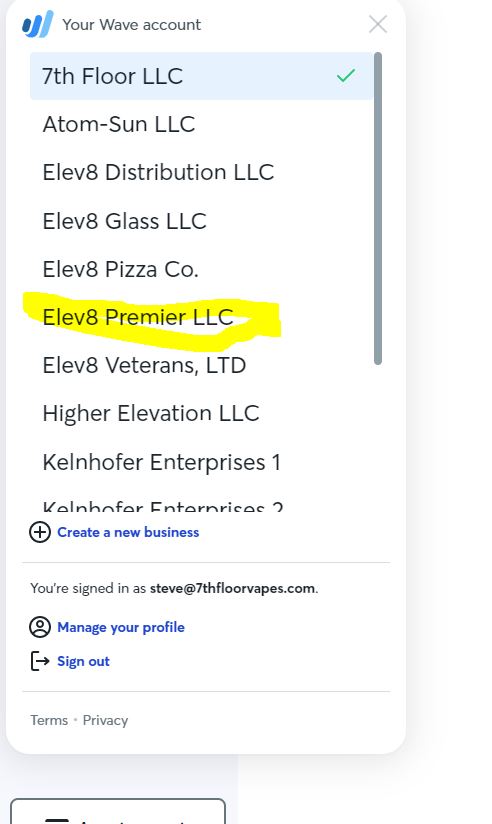
- Click on Sales and Payments
- Click on Invoices
- Click Create a new invoice
- Click add a customer
- If you see a customer you have used before, pick that customer
- For a new customer click on Create a new customer
- Enter their full name or business for the Customer input
- Enter their email (this is where the invoice will be sent to)
- Enter their phone number if you have it
- Enter their first and last name of the contact
- click save
- Click Add Item
- If you see an item click it and add it.
- If you do not see the item click Create a new item
- Enter the name
- Enter a description
- Enter the price
- Click Edit Income account and pick proper account. If you have ANY questions please ask the book keeper for advice.
EXAMPLE View Income Account – if it is Raw Glass, click on Raw Glass
- Scroll down and click Save and continue
- Click Approve Draft
- Click Send Invoice
- Check the Send a copy to myself
- Check attach the invoice a pdf
- Click Send
- Click close and you are done
Protected: Printing Labels for Orders
Protected: HOW TO PRINT A LABEL WITHOUT AN EXISTING ORDER
Protected: Open the Shipping Area
Passwords to Elev8 Premier
The password to get on to the computer is 6331
Password for GMAIL. Behind computer monitor in office.
Spotifiy Steve’s email and pass is 1steve1
I am not able to leave a note in Elev8.one for a customer or contact
In order to leave notes you the customer must have a (First Name, Last Name, Email and Office Phone.
If the contact has all of these and you still can not leave a note, contact Admin ASAP

IT Procedure Guide for Elev8 Distribution
See Link
Elev8 Distribution Right Hand Man Job Duties
See the protected link